
by Sue Ann Kendall
Last Thursday, I headed out to observe wildlife at the Nails Creek Unit of Lake Somerville State Park. My usual method of observing is to take pictures of what I find, then upload the photos to iNaturalist for identification and to document what’s out there. (I also have Merlin Bird ID going most of the time, to catch the birds flying around.) I had a nice walk out by the lake, where I saw many ducks, hundreds of White Pelicans, and some plants I hadn’t seen before. What a lovely afternoon!

Of course, I fired up iNaturalist on my iPhone when I got back to my campsite. To my surprise, there was a notice saying that I should download the new iNaturalist right now, because it has all sorts of wonderful new features (not available on Android yet).

I downloaded iNaturalist Next, as it’s called now, like a good user, but I went ahead and identified my photos on the old app, which still works just fine. I then read all about the new version, which you can, too, by going to their blog. It’s a good idea to do that before starting to use the new one.

The next day I tried out the new version. I was especially intrigued by the new feature that lets you point to a plant or other living thing and get suggested identifications. So, if you just want to check on something or resolve an argument with your friends about what something is, you can do it without uploading to the database. This is like the Seek app many people use.
After some trial and error, I was happy to figure out that you can take a photo from within the app, get a suggested ID, confirm it (or select another option if you know better), then upload it right then. Off you go to the next intriguing plant. This really saves a lot of time going back in and uploading later.

I have to say it’s not the most intuitive interface ever created (I’m qualified to judge, because I supported users of an application with a horrible UI from 2011-2025, so I know one when I see one). However, once I figured out how to do what I wanted to do, it was just fine. I was also happy to see a pop-up with instructions on how to make the new version work a bit more like the old one, for us creatures of habit, and a reasonable tutorial on the blog post. Here are a few tips I’ve come up with so far:

- Take your pictures carefully. You’ll see possible IDs coming up as you aim the camera at something, if you move slightly or annoy the app in some magical way I don’t understand yet, it might go back to identifying by family or worse. So be sure to snap at the right time to get the ID you want; otherwise you have to go back in and edit the observation, which works like the old iNat.
- Note that the photos the app takes are an odd rectangular shape. If you are going to use photos taken with the app for other purposes, you’ll want to go in and crop them to a more useful aspect ratio.
- I also find that it’s harder to focus on your organism from within the app than using the phone camera app. I frequently got frustrated trying to get a good image, especially of insects. A couple of times I just took a phone photo and identified the insect or plant later. If you are careful to only upload nice, sharp pictures to iNat, you might just want to get the suggestions in the app, but take pictures separately.
- One of the good new features is being able to upload a lot of photos at once (up to 20) for identification. You can group photos of the same organism to go in one observation, but read the instructions first, because I found it to be challenging when I started out. Once you get it, it’s fun.
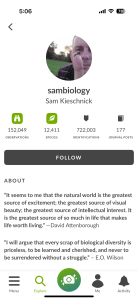
Overall, I think I’ll like this new app just fine. The only thing I really miss is that I liked the more compact list of your observations on the Me tab in the old one. And I think there are some issues with traditional projects that need to be resolved, for those of us who use a lot of projects. New features, like viewing other users’ profiles on the phone, make up for any issues I have. I loved that their example was Sam K.
It’s spring, though, and plants are blooming, so get out there and identify some of what you see on this new app. I’ll be waiting for reviews from some of our Super Users.
 Nature Along the El Camino Real
I love INaturalist! I signed up two years ago in Galveston at a nature presentation there.
LikeLiked by 1 person
It’s really added a lot of fun to my life.
LikeLiked by 1 person